
What is Form 8879?
Form 8879, IRS e-file Signature Authorization, is the form you sign so we can send (e-file) your tax return to the IRS.
This is the last step before we e-file your return
We can't file until you sign it. Once you sign, we send your return to the IRS.
What you are agreeing to when you sign
- Your return is correct. You looked at a copy of your return, and it is true, correct and complete to the best of your knowledge.
- We can send it. You allow Jr's Notary to e-file your return and to receive the IRS's answer (accepted or rejected, and any refund delays).
- Payment, only if you owe. If you chose to pay a balance from your bank account, you authorize the IRS to take that payment.
- Your PIN is your signature. A 5-digit number (PIN) is used as your electronic signature on the return. You allow us to enter it for you.
Before you sign, check these
- Your name and Social Security number (and your spouse's, if you file jointly) are correct.
- The numbers in Part I match the copy of your return: income, tax, tax withheld, and your refund or the amount you owe.
- Your refund bank account, or how you will pay, is what you asked for.
If something looks wrong, don't sign yet. Call or text Laurencio at 915 525 5521 and we will fix it first.
The form, step by step
This is a blank Form 8879. The numbers on the picture match the list below.
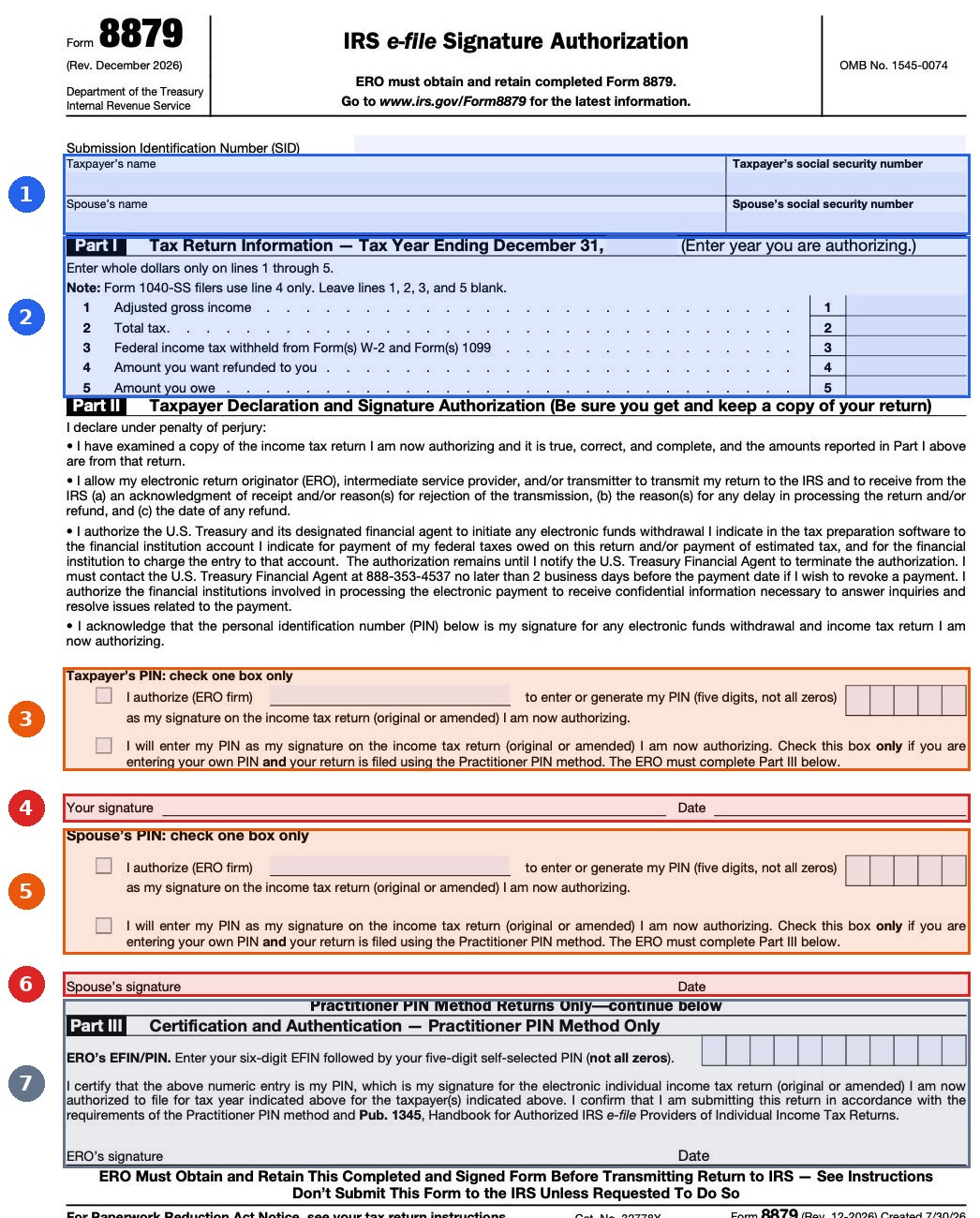
- 1Names and Social Security numbers
We fill these in. Make sure they are right. - 2Part I: the main numbers from your return
We fill these in. Compare them with your copy of the return. - 3Your PIN
We check this box and enter a 5-digit PIN as your electronic signature. You don't need to choose or remember it. - 4Your signature and dateYou sign
Sign here. - 5Spouse's PIN
Joint returns only. Same as number 3. - 6Spouse's signature and dateYou sign
Joint returns only. Your spouse signs here. - 7Part III: the preparer's partWe sign
Laurencio signs this part. Nothing for you to do here.
How to sign
- Online, in our client portal. You review and sign on your phone or computer. Step-by-step help with pictures
- On paper. We send you a link to download your Form 8879 and a copy of your return. Print the form, sign and date it by hand, take a clear photo of the whole page, and upload it with the secure upload link we text you.
- In person. Sign at our office on our signature pad. Please bring your photo ID.
After you sign
We e-file your return. You can check your refund at irs.gov/refunds about 24 hours after the IRS accepts it. Keep the copy of your return we give you for your records.
Form 8879 is not your tax return, and you don't mail it to the IRS. We keep the signed form for 3 years, as the IRS requires. A blank copy is on the IRS website: Form 8879 (PDF).
Questions? Call or text 915 525 5521 or email [email protected].